
Amp, Cab, and Effect Models
In this chapter we cover how to select and configure Amp, Speaker Cabinet, and Effect models on your POD Express device. Please also check out these official Line 6 videos for demonstrations showcasing some of the tones possible with POD Express.
https://www.youtube.com/watch?v=0fMMHFvZ4oI
https://www.youtube.com/watch?v=r6VPZGDX4Qc
Amp Models
POD Express devices each include 7 Amp and 7 Cab models derived from the award-winning HX® family of processors. The Amp & Cab models are accessed via the AMP encoder, with its LED ring indicating model selection and parameter edit values. It's really just as simple as turning the AMP encoder to choose your desired amp and a matching speaker cab is automatically loaded. You can also tweak amp parameters to taste, as covered within this chapter.

Note: All Amp & Cab models are mono—but you can utilize your device's Mod, Delay, and Reverb effects to create huge stereo soundscapes! See Effect Models.
Selecting an Amp Model
The seven amp models are labeled in red and selectable via the AMP encoder. The corresponding LED ring segment (1-7) lights red to indicate your selected model as you turn the encoder. To bypass the amp, set the knob to the (OFF) position. For example, when the POD Express Guitar - Clean amp model is selected, the position 1 segment is lit red.
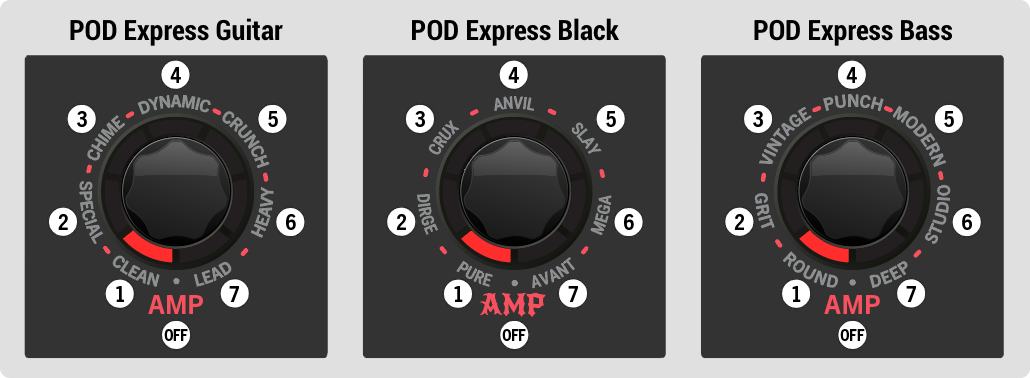
The POD Express devices' Amp Encoder positions
POD Express Amp Models
To follow are complete lists of Amp models for each POD Express device. Also see the following list of Cab Models.
 POD Express Guitar Amp Models
POSITION | TYPE | BASED ON* |
|---|---|---|
1 | CLEAN | Fender® Princeton Reverb® |
2 | SPECIAL | Line 6 Litigator |
3 | CHIME | Matchless® DC30 (Channel 1, clean) |
4 | DYNAMIC | Ben Adrian Cartographer |
5 | CRUNCH | Friedman® BE-100 (BE/HBE channel) |
6 | HEAVY | Line 6 Oblivion |
7 | LEAD | Peavey® 5150® |
| OFF | N/A |

 POD Express Bass Amp Models
POSITION | TYPE | BASED ON* |
|---|---|---|
1 | ROUND | Ampeg® B-15NF Portaflex® |
2 | GRIT | Ampeg SVT® (Normal channel) |
3 | VINTAGE | Fender® Bassman® Silver Panel |
4 | PUNCH | Gallien-Krueger® GK 800RB |
5 | MODERN | Darkglass® Electronics Microtubes® B7K Ultra |
6 | STUDIO | Aguilar® Tone Hammer |
7 | DEEP | MESA/Boogie® M9 Carbine |
| OFF | N/A |
*See U.S. Registered Trademarks. All product names used in this document are trademarks of their respective owners and neither Yamaha Guitar Group nor Line 6 are associated or affiliated with them. These trademarks appear solely to identify products whose tones and sounds were studied by Line 6 during sound model development.
Speaker Cab Models
As mentioned in the preceding Amp Models section, anytime an Amp model is selected, a matched default Speaker Cabinet model is automatically loaded. Please refer to the following Cab Model tables for the LED position that refers to each Amp model and its respective matched Cab model. You can optionally select a different Cab for your current Amp as well.
Selecting a Cab Model
For any Amp model, you can optionally change the Cab model to any of the seven included Cabs, or turn the knob to “Off” (no pink LED is lit) for no cab.* Changing cabs can provide a variety of available tones for the current Amp model!

*Tip: You can choose “Off” for no Cab model if you plan on sending your device output to an external amplifier or into a Cab simulator/IR loader.
Press and hold both the ALT button and TAP footswitch while turning the AMP encoder to select a Cab.
You’ll see one of the LED ring segments light pink to indicate the selected Cab model, as listed in the preceding tables.
In the example below, the position 3 pink LED segment is lit, indicating that the “2x12 Matchless” (POD Express Guitar) or “2x15 Fender” (POD Express Bass) Cab model is selected.
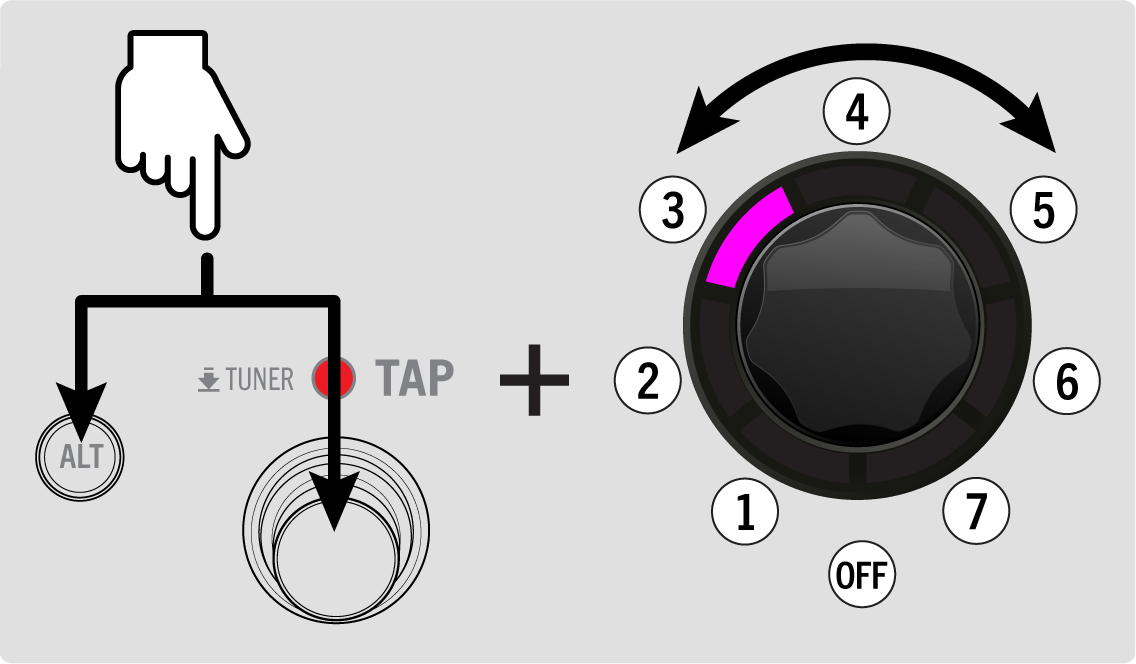
Selecting a Cab model
POD Express Cab Model Lists
To follow are the complete lists of Cab models for each POD Express device.
POD Express Guitar Cab Models
POSITION | TYPE | BASED ON* |
|---|---|---|
1 | CLEAN | 1x10" Fender Princeton Reverb |
2 | SPECIAL | 1x12" Fender Deluxe® Oxford |
3 | CHIME | 2x12" Matchless DC-30, G12H30 |
4 | DYNAMIC | 4x12" Bogner® überkab, V30 |
5 | CRUNCH | 4x12" Marshall® Basketweave, G12-M25 |
6 | HEAVY | 4x12" ENGL® XXL, V30 |
7 | LEAD | 4x12" MESA/Boogie 4FB, V30 |
| OFF | N/A |
POD Express Bass Cab Models
POSITION | TYPE | BASED ON* |
|---|---|---|
1 | ROUND | 1x15" Ampeg B-15 |
2 | GRIT | 8x10" Ampeg SVT |
3 | VINTAGE | 2x15" Fender Bassman, D130 |
4 | PUNCH | 4x10" Ampeg SVT 410HLF |
5 | MODERN | 4x10" Eden D410XLT |
6 | STUDIO | 1x12" Epifani® Ultralight |
7 | DEEP | 6x10" MESA/Boogie PowerHouse® |
| OFF | N/A |
*See U.S. Registered Trademarks . All product names used in this document are trademarks of their respective owners and neither Yamaha Guitar Group nor Line 6 are associated or affiliated with them. These trademarks appear solely to identify products whose tones and sounds were studied by Line 6 during sound model development.
Effect Models
POD Express devices include a variety of Effect models derived from the award-winning HX family of processors, as well as from the classic DL4™ and “M” series stompboxes and processors. You can choose any model from each of the four Effects knobs for up to four simultaneous Effects to create your tone masterpieces, with plenty of parameter tweaking on tap! An input Noise Gate and an expression pedal-accessible Volume are also available on all POD Express devices.
About the Signal Path and Stereo Functionality
First, it may be helpful to understand the signal path of your POD Express device to get the most out of its stereo effects. The device functions as a mono input - stereo output guitar/bass processor. It accepts the mono input from your instrument via the IN jack and outputs stereo when both the OUT Left and Right jacks are connected (assuming you've enabled stereo effects—as we'll discuss in this chapter). When only the OUT - L/MONO jack is connected (if no headphones are connected), the device's stereo output is folded to mono.
POD Express devices include several processing “blocks” within their signal path which embellish your input signal from dry and uninspiring to fully-baked performance glory. To follow is the signal path block order. Note that all effects “post” the Amp/Cab and Volume Pedal are stereo.
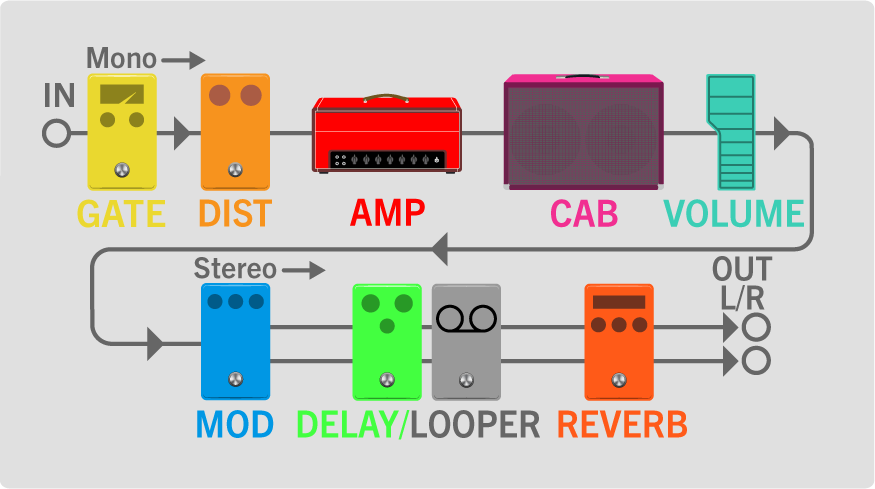
The POD Express Guitar signal path (PNG)
The POD Express Guitar signal path (SVG)
Selecting and Adjusting an Effect Model
All you need to do is turn one of the four Effects knobs to select a labeled model to put it into use, or turn the knob to fully counterclockwise for no effect. You can enable one effect on each of the four Effects category knobs simultaneously, providing a plethora of available tones and textures.
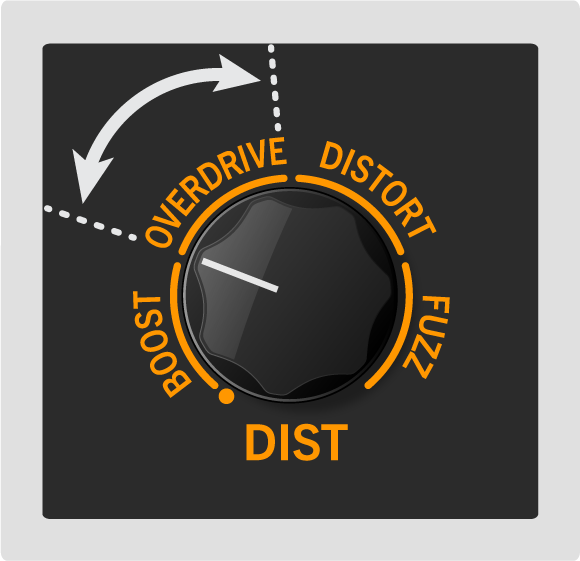
Selecting an Effect model
POD Express Guitar Effects Model Lists
To follow are complete lists of Effect models for all POD Express devices.
POD Express Guitar Models
To follow are all guitar effects models included on each of the Effects knobs on POD Express Guitar, including the actual effect unit upon which each is based
Distortion Models
TYPE | MONO/STEREO | BASED ON* |
|---|---|---|
BOOST | Mono | Klon® Centaur |
OVERDRIVE | Mono | Ibanez® TS808 Tube Screamer® |
DISTORTION | Mono | BOSS® DS-1 Distortion (Keeley modded) |
FUZZ | Mono | ‘73 Electro-Harmonix® Ram’s Head Big Muff Pi |
Modulation Models
TYPE | MONO/STEREO | BASED ON* |
|---|---|---|
CHORUS | Stereo | Modded Arion SCH-Z chorus |
FLANGER | Stereo | MXR® 117 Flanger |
PHASER | Stereo | MXR Phase 90 |
TREMOLO | Stereo | Fender optical tremolo circuit |
Delay/Looper Models
TYPE | MONO/STEREO | BASED ON* |
|---|---|---|
ANALOG | Stereo | BOSS DM-2 w/ Adrian Mod |
DIGITAL | Stereo | Line 6 Original |
TAPE | Stereo | Maestro® Echoplex® EP-3 |
PONG | Stereo | Line 6 Original (Ping Pong style) |
LOOPER | Stereo | Line 6 Original (1 Switch Looper) |
Reverb Models
TYPE | MONO/STEREO | BASED ON* |
|---|---|---|
SPRING | Stereo | Line 6 Original |
HALL | Stereo | Line 6 Original |
PLATE | Stereo | Line 6 Original |
SPACE | Stereo | Line 6 Original |
*See U.S. Registered Trademarks. All product names used in this document are trademarks of their respective owners and neither Yamaha Guitar Group nor Line 6 are associated or affiliated with them. These trademarks appear solely to identify products whose tones and sounds were studied by Line 6 during sound model development.
POD Express Bass Effect Models
To follow are all guitar effects models included on each of the Effects knobs on POD Express Bass, including the actual effect unit upon which each is based.
Compressor Models
TYPE | MONO/STEREO | BASED ON* |
|---|---|---|
OPTICAL | Mono | Ampeg Opto Comp |
LA | Mono | Teletronix® LA-2A® |
DELUXE | Mono | Line 6 Original |
LIMITER | Mono | Ashly® CLX-52 (in conjunction w/ B. Sheehan) |
Synth Models
TYPE | MONO/STEREO | BASED ON* |
|---|---|---|
OCTAVE | Mono | BOSS OC-2 Octaver |
GROWL | Mono | Line 6 Original |
STRING | Mono | Roland® GR700 Guitar Synth |
MUTANT | Mono | Musitronics® Mu-Tron III |
Distortion Models
TYPE | MONO/STEREO | BASED ON* |
|---|---|---|
OPAMP | Mono | Fulltone® OCD |
LED | Mono | Earthquaker Devices® Plumes (Mode 1 - LED) |
DIST | Mono | Pro Co® RAT (with LM308 opamp) |
FUZZ | Mono | Electro-Harmonix® Russian Big Muff Pi |
Modulation/Delay/Looper Models
TYPE | MONO/STEREO | BASED ON* |
|---|---|---|
| ||
CHORUS | Stereo | Modded Arion SCH-Z chorus |
FLANGER | Stereo | MXR 117 Flanger |
PHASER | Stereo | MXR Phase 90 |
| ||
DIGITAL | Stereo | Line 6 Original |
LOOPER | Stereo | Line 6 Original (1 Switch Looper) |
*See U.S. Registered Trademarks. All product names used in this document are trademarks of their respective owners and neither Yamaha Guitar Group nor Line 6 are associated or affiliated with them. These trademarks appear solely to identify products whose tones and sounds were studied by Line 6 during sound model development.